HabitQuest Multiplatform UI Architecture
The HabitQuest UI is a Kotlin Multiplatform (KMP) application built with Jetpack Compose that targets multiple platforms from a single codebase. The architecture combines Domain-Driven Design (DDD) principles with hexagonal architecture to achieve platform independence.
Overview
Rationale for Multiplatform
The HabitQuest UI was designed as a multiplatform application to Maximize code sharing: Business logic, domain models, UI composition, and data layer are shared across all platforms
Technology Stack
| Component | Technology | Version | Rationale |
|---|---|---|---|
| Language | Kotlin | 2.x | Type-safe, null-safe, coroutine-native |
| UI Framework | Jetpack Compose Multiplatform | 1.10.0 | Declarative UI, shared composables |
| HTTP Client | Ktor Client | Latest | Multiplatform HTTP with platform-specific engines |
| Serialization | Kotlinx Serialization | Latest | Type-safe JSON parsing without reflection |
| Coroutines | Kotlinx Coroutines | Latest | Async/await with structured concurrency |
| DateTime | Kotlinx DateTime | Latest | Multiplatform date/time without platform libraries |
Multiplatform Target Support
The project compiles to 6 distinct platforms using KMP:
1. Android (androidMain)
- Purpose: Primary mobile target
- Build Tool: Gradle (AGP - Android Gradle Plugin)
- Output:
.apkdebug / release binaries - Dependencies: Android-specific (OkHttp client, KalendarKit for calendar integration)
- Entry Point:
MainActivity.kt(ComponentActivity with Compose)
2. iOS (iosMain)
- Purpose: Secondary mobile target
- Build Tool: Gradle (via Kotlin/Native)
- Output:
ComposeApp.framework(Kotlin framework bridged to SwiftUI) - Dependencies: Darwin HTTP client, KalendarKit for calendar integration via EventKit
- Entry Point:
MainViewController.kt(ComposeUIViewController) - Native Integration:
iosApp.xcodeproj(Xcode project) hosts Swift UI wrapper
3. JVM (Desktop) (jvmMain)
- Purpose: Desktop application for testing and development
- Build Tool: Gradle
- Output: Standalone executable (Dmg/Msi/Deb)
- Dependencies: Compose Desktop, OkHttp client, Swing integration
- Entry Point:
main.kt(Compose Desktop window application) - Note: Calendar feature unavailable on desktop (returns explicit failure)
4. JavaScript (jsMain)
- Purpose: Web browser support
- Build Tool: Gradle (Kotlin/JS via Node.js)
- Output: JavaScript bundle (distributed via web server)
- Dependencies: JavaScript HTTP client (fetch-based)
- Entry Point:
main.kt(ComposeViewport in DOM) - Note: Calendar feature unavailable on web
5. WebAssembly (wasmJsMain)
- Purpose: Experimental web support with better performance than JS
- Build Tool: Gradle (Kotlin/Wasm with Binaryen)
- Output: WebAssembly module + JavaScript glue code
- Dependencies: JavaScript HTTP client
- Entry Point:
main.kt(ComposeViewport in DOM) - Note: Calendar feature unavailable on Wasm
6. Test (commonTest)
- Purpose: Shared unit/integration tests
- Build Tool: Gradle
- Output: Test results (platform-agnostic)
- Dependencies: Kotlin test framework
Project Structure
Directory Hierarchy
habitquest-ui/composeApp/
├── build.gradle.kts                      # Kotlin Multiplatform build configuration
├── src/
│   ├── commonMain/                        # Shared code (100% platform-independent)
│   │   └── kotlin/compose/project/demo/
│   │       ├── App.kt                     # Root composition function
│   │       ├── MainScaffold.kt            # Main navigation scaffold
│   │       ├── Platform.kt                # Platform abstraction interface
│   │       ├── NetworkConfig.kt           # Shared HTTP client setup
│   │       ├── AchievementsPage.kt        # Shared UI screen
│   │       ├── LegacyDomainAliases.kt     # Domain model re-exports
│   │       └── contexts/                  # DDD-organized contexts
│   │           ├── auth/                  # Authentication context
│   │           ├── habits/                # Habits/tracking context
│   │           ├── avatar/                # Character/avatar context
│   │           ├── marketplace/           # Shop/inventory context
│   │           ├── guild/                 # Social/guild context
│   │           ├── quest/                 # Quests context
│   │           └── dashboard/             # Dashboard context
│   │
│   ├── androidMain/                       # Android-only code
│   │   └── kotlin/compose/project/demo/
│   │       ├── MainActivity.kt            # Android entry point
│   │       ├── Platform.android.kt        # Android Platform implementation
│   │       └── contexts/                  # Context-specific Android overrides
│   │
│   ├── iosMain/                           # iOS-only code
│   │   └── kotlin/compose/project/demo/
│   │       ├── MainViewController.kt      # iOS entry point
│   │       ├── Platform.ios.kt            # iOS Platform implementation
│   │       └── contexts/                  # Context-specific iOS overrides
│   │
│   ├── jvmMain/                           # JVM Desktop code
│   │   └── kotlin/compose/project/demo/
│   │       ├── main.kt                    # Desktop entry point
│   │       ├── Platform.jvm.kt            # JVM Platform implementation
│   │       └── contexts/
│   │
│   ├── jsMain/                            # JavaScript/Browser code
│   │   └── kotlin/compose/project/demo/
│   │       ├── main.kt                    # Web entry point
│   │       ├── Platform.js.kt             # JS Platform implementation
│   │       └── contexts/
│   │
│   ├── wasmJsMain/                        # WebAssembly code
│   │   └── kotlin/compose/project/demo/
│   │       ├── main.kt                    # Wasm entry point
│   │       ├── Platform.wasmJs.kt         # Wasm Platform implementation
│   │       └── contexts/
│   │
│   ├── webMain/                           # Web-specific (minimal)
│   │   └── kotlin/...
│   │
│   └── commonTest/                        # Shared test code
│       └── kotlin/compose/project/demo/
│
├── iosApp/                                # Native iOS Xcode project
│   ├── iosApp.xcodeproj/                 # Xcode project file
│   ├── iosApp/
│   │   ├── ContentView.swift             # SwiftUI wrapper around Kotlin Compose
│   │   └── Info.plist                    # iOS app manifest + permissions
│   └── Configuration/
│       └── Config.xcconfig               # Build configuration
│
└── build/                                 # Generated build artifacts
    ├── bin/                              # Binary outputs
    │   ├── iosArm64/debugFramework/      # iOS framework (real device)
    │   └── iosSimulatorArm64/            # iOS framework (simulator)
    └── xcode-frameworks/                 # Frameworks for Xcode linking
Within Each Context Directory
Each DDD context (e.g., contexts/habits/) follows a consistent internal structure:
contexts/habits/
├── application/                           # Use cases and application services
│   └── *.kt                              # LoginUseCase, CreateHabitUseCase, etc.
│
├── domain/                                # Domain models and contracts
│   ├── model/                            # Value objects and aggregates
│   │   └── *.kt                          # HabitListItem, HabitCalendarEntry, etc.
│   └── contract/                         # Domain abstractions
│       └── *.kt                          # HabitResult sealed interfaces
│
├── infrastructure/                        # Technical implementations
│   ├── repository/                       # API clients and data access
│   │   └── HabitsApiRepository.kt        # REST client for habit management
│   │
│   ├── mapper/                           # DTO ↔ Domain model translation
│   │   └── HabitDtoMapper.kt             # JSON parsing and mapping logic
│   │
│   ├── calendar/ (habits-specific)       # Platform-specific integrations
│   │   ├── HabitCalendarLauncher.kt      # Shared calendar launcher interface
│   │   ├── HabitCalendarLauncher.android.kt
│   │   ├── HabitCalendarLauncher.ios.kt
│   │   ├── HabitCalendarLauncher.jvm.kt
│   │   ├── IOSCalendarPlatform.kt        # iOS-specific calendar manager
│   │   └── ... (other platforms)
│   │
│   └── dto/                              # API response models
│       └── (if present)
│
└── presentation/                          # UI layer
    ├── screen/                           # Full-page composables
    │   └── HabitsPage.kt                 # Habits list screen
    │
    └── component/                        # Reusable UI components
        └── *.kt                          # Individual composable functions
Design Principles
1. Domain-Driven Design (DDD)
The codebase is organized by business capability, not technical layer. Each bounded context represents a distinct business domain:
- Auth Context: User identity and authentication (login, registration, token validation)
- Habits Context: Habit creation, completion, recurrence (tracking domain)
- Avatar Context: Character state management (stats, inventory, equipment)
- Marketplace Context: Item trading, currency management (commerce)
- Quest Context: Challenge definition and progression (meta-gaming)
- Guild Context: Social organization and boss battles (multiplayer)
- Dashboard Context: User home screen and aggregate views
2. Hexagonal Architecture (Ports & Adapters)
Each context is decoupled from external systems via clearly defined boundaries:
           UI LAYER (Presentation)
              ↓
    ┌─────────────────────┐
    │   Composable Screens │
    └──────────────┬──────┘
                   ↓ (calls business logic)
    ┌─────────────────────┐
    │  Application Layer   │ ← Use cases
    ├─────────────────────┤
    │   Domain Layer       │ ← Models, contracts
    ├──────────┬──────────┤
    │ PRIMARY  │SECONDARY │
    │  PORTS   │  PORTS   │
    └──────────┴──────────┘
                   ↓ (calls adapters)
    ┌─────────────────────┐
    │ Infrastructure Layer │ ← Repositories, mappers
    │ (Adapters)          │
    └─────────────────────┘
                   ↓
    ┌─────────────────────┐
    │   External Systems  │ ← APIs, databases
    └─────────────────────┘
- Primary Ports (inbound): Presentation layer uses these to invoke business logic
- Secondary Ports (outbound): Domain defines these; infrastructure implements them
- Adapters: Infrastructure layer implements ports via HTTP clients, local storage, etc.
Domain logic has zero dependencies on UI framework or external services.
DDD Context Organization
Example: Habits Context (Detailed)
Domain Layer (domain/)
Models (domain/model/):
// Value object representing a habit entry in the user's list
data class HabitListItem(
    val id: String,
    val title: String,
    val description: String,
    val tags: List<String>,
    val recurrenceType: String,  // "DAILY", "WEEKLY", "MONTHLY"
    val recurrenceDayOfWeek: String? = null,
    val recurrenceDayOfMonth: Int? = null,
    val lastAttendedDate: String?,
    val nextRecurrenceDate: String?,
    val associatedQuestId: String? = null,
)

// Calendar event ready for platform integration
data class HabitCalendarEntry(
    val title: String,
    val description: String,
    val startDateTime: LocalDateTime,
    val durationMinutes: Int = 30,
)
Contracts (domain/contract/):
// Domain result types for habit operations
sealed interface HabitListResult {
    data class Success(val habits: List<HabitListItem>) : HabitListResult
    data class Error(val message: String) : HabitListResult
}

sealed interface AttendHabitResult {
    data object Success : AttendHabitResult
    data class Error(val message: String) : AttendHabitResult
}
Application Layer (application/)
Use Cases:
// Orchestrates fetching habits for a given avatar
class FetchHabitsUseCase(private val repository: HabitsRepository) {
    suspend operator fun invoke(token: String, avatarId: String): HabitListResult {
        return repository.fetchHabitsByAvatar(token, avatarId)
    }
}

// Orchestrates marking a habit as completed
class AttendHabitUseCase(private val repository: HabitsRepository) {
    suspend operator fun invoke(token: String, habitId: String): AttendHabitResult {
        return repository.attendHabit(token, habitId)
    }
}
Infrastructure Layer (infrastructure/)
Repository (infrastructure/repository/HabitsApiRepository.kt):
class HabitsApiRepository {
    suspend fun fetchHabitsByAvatar(token: String, avatarId: String): HabitListResult {
        return try {
            val response = client.get("$BASE_URL/api/v1/habits") {
                bearerAuth(token)
                parameter("avatarId", avatarId)
            }
            val habits = Json.decodeFromString<List<HabitDto>>(response.bodyAsText())
            HabitListResult.Success(habits.map { it.toDomain() })
        } catch (error: Exception) {
            HabitListResult.Error("Failed to fetch habits: ${error.message}")
        }
    }
}
Mapper (infrastructure/mapper/HabitDtoMapper.kt):
internal fun parseHabitList(payload: JsonArray): List<HabitListItem> {
    return payload.mapNotNull { element ->
        val obj = element as? JsonObject ?: return@mapNotNull null
        val recurrence = obj["recurrence"]?.jsonObject
        HabitListItem(
            id = obj["id"]?.jsonPrimitive?.contentOrNull ?: return@mapNotNull null,
            title = obj["title"]?.jsonPrimitive?.contentOrNull.orEmpty(),
            // ... map remaining fields
        )
    }
}
Calendar Launcher (Platform-Specific):
- Common Interface (
commonMain): Defines contract and return type - Android (
androidMain): UsesCalendarEventManagerfrom KalendarKit - iOS (
iosMain): UsesCalendarEventManagerbridged to EventKit - Desktop/Web (
jvmMain,jsMain,wasmJsMain): Returns explicit "unsupported" failure
Presentation Layer (presentation/)
Screen (presentation/screen/HabitsPage.kt):
@Composable
fun HabitsScreen(
    token: String,
    avatarState: AvatarUiState,
    onHabitAttended: () -> Unit = {},
    habitCalendarLauncher: HabitCalendarLauncher,  // Platform-provided
) {
    val habitRepository = remember { HabitsApiRepository() }
    var uiState by remember { mutableStateOf<HabitsUiState>(HabitsUiState.Loading) }

    LaunchedEffect(token, avatarState) {
        // Load habits via use case
    }

    // Render UI based on state
}
Layered Architecture
Clean Architecture Layers (Per Context)
┌─────────────────────────────────────────┐
│      PRESENTATION LAYER (UI)            │
│  • Composable functions                 │
│  • UI state management                  │
│  • Event handlers                       │
├─────────────────────────────────────────┤
│      APPLICATION LAYER                  │
│  • Use cases (business orchestration)   │
│  • Application services                 │
├─────────────────────────────────────────┤
│      DOMAIN LAYER                       │
│  • Aggregates (entities + value objs)   │
│  • Domain contracts (interfaces)        │
│  • Business rules (pure logic)          │
├─────────────────────────────────────────┤
│      INFRASTRUCTURE LAYER               │
│  • Repository implementations           │
│  • DTO mappers                          │
│  • HTTP clients (Ktor)                  │
│  • Platform-specific adapters           │
├─────────────────────────────────────────┤
│      EXTERNAL SYSTEMS                   │
│  • REST APIs (microservices)            │
│  • Calendar systems (iOS EventKit, etc.)│
│  • Local device storage                 │
└─────────────────────────────────────────┘
Dependency Rule
- Upper layers (presentation) depend on lower layers (domain)
- Lower layers (domain) have NO dependencies on upper layers
- All dependencies point inward toward the domain
Result: Domain is testable and reusable; UI can be replaced without affecting business logic.
Shared Code vs Platform-Specific Code
Shared Code (commonMain/)
90%+ of the codebase:
- Domain models and business logic
- Composable UI functions (layouts, screen orchestration)
- HTTP client configuration and API calls
- Serialization and data mapping
- Navigation and state management
Why: These concerns are platform-agnostic and require only standard Kotlin libraries.
Platform-Specific Code
Platform-specific API integration was required to implement calendar functionality. This feature allows users to add their scheduled habits as events in their device's calendar.
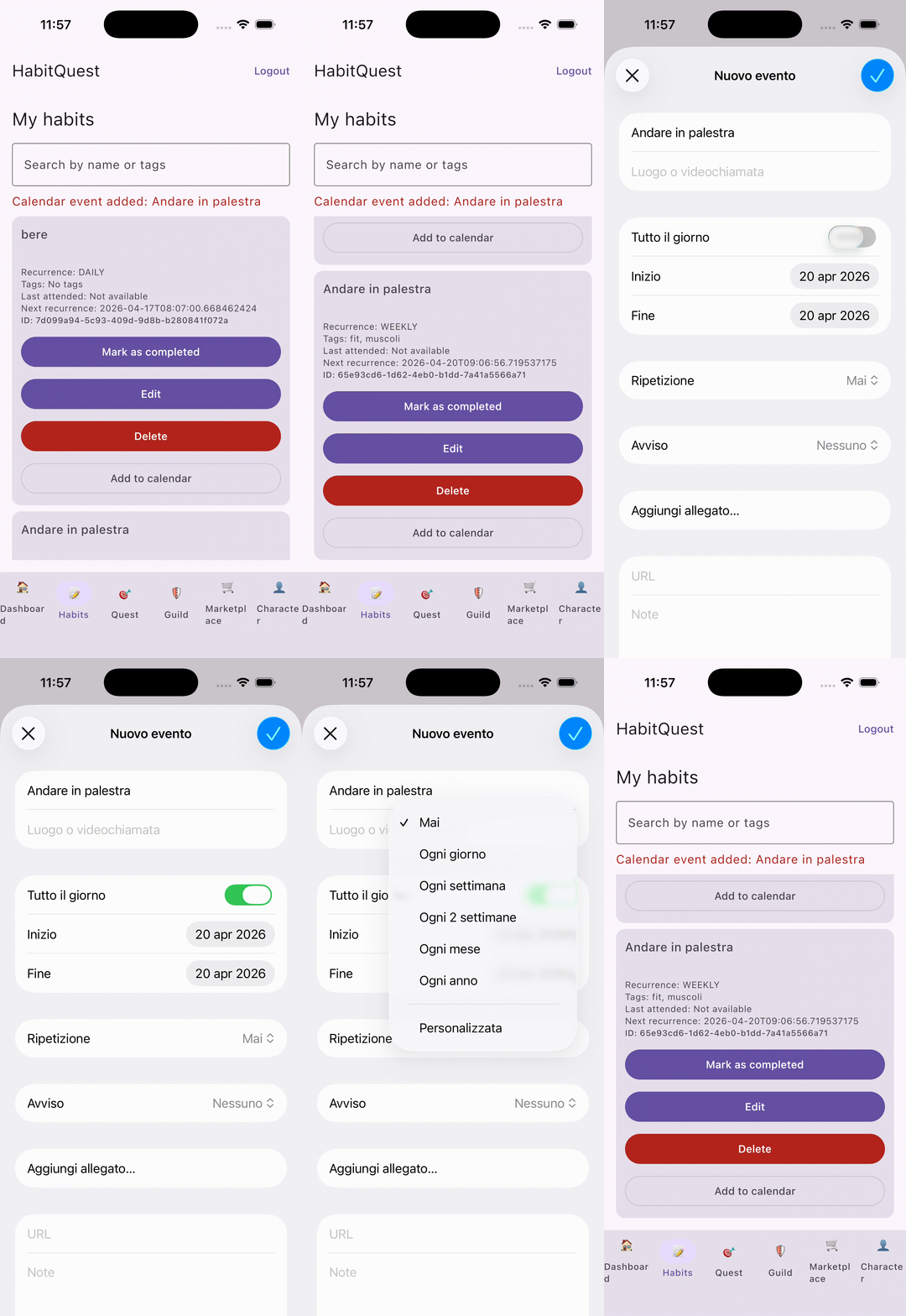
Android (androidMain/)
- Entry Point:
MainActivity.kt– Android ComponentActivity - Calendar Integration:
HabitCalendarLauncher.android.ktusesCalendarEventManager - HTTP Client: OkHttp engine (configured in
networkConfig) - Size: ~5% of total code
iOS (iosMain/)
- Entry Point:
MainViewController.kt– ComposeUIViewController - Calendar Integration:
HabitCalendarLauncher.ios.ktusesCalendarEventManagerIOSCalendarPlatform.ktbridges to iOS EventKit APIiosApp/iosApp/Info.plistdeclaresNSCalendarsUsageDescriptionpermission- HTTP Client: Darwin (native URLSession-based)
- Size: ~5% of total code
JVM Desktop (jvmMain/)
- Entry Point:
main.kt– Compose Desktop window - Calendar Integration: Unavailable (returns failure)
- HTTP Client: OkHttp
- Size: ~2% of total code
JavaScript (jsMain)
- Entry Point:
main.kt– ComposeViewport - Calendar Integration: Unavailable (returns failure)
- HTTP Client: JavaScript fetch API
- Size: ~2% of total code
WebAssembly (wasmJsMain/)
- Entry Point:
main.kt– ComposeViewport - Calendar Integration: Unavailable (returns failure)
- HTTP Client: JavaScript fetch API
- Size: ~2% of total code
Build Phases
- Compile Metadata (
compileCommonMainKotlinMetadata) - Validates shared code for all platforms
-
Generates expect/actual mappings
-
Platform-Specific Compilation
compileKotlinAndroid→ Android bytecodecompileKotlinIosArm64,compileKotlinIosSimulatorArm64→ Native binariescompileKotlinJvm→ JVM bytecodecompileKotlinJs→ JavaScript-
compileKotlinWasmJs→ WebAssembly -
Framework Generation (iOS only)
linkDebugFrameworkIosSimulatorArm64→ Simulator framework-
embedAndSignAppleFrameworkForXcode→ Link to Xcode project -
Assembly
- Android:
assembleDebug→ APK - iOS: Xcode build → IPA
- JVM:
jar/distZip→ Distributions - Web: Bundle → Static files
Platform Entry Points
Android (androidMain/MainActivity.kt)
class MainActivity : ComponentActivity() {
    override fun onCreate(savedInstanceState: Bundle?) {
        enableEdgeToEdge()
        super.onCreate(savedInstanceState)

        setContent {
            App(habitCalendarLauncher = rememberHabitCalendarLauncher())
        }
    }
}
What happens:
1. Android system creates MainActivity
2. Jetpack Compose replaces the entire view hierarchy
3. Platform-specific calendar launcher is injected
4. App() composable is rendered into the activity
iOS (iosMain/MainViewController.kt)
fun MainViewController() =
  ComposeUIViewController {
    App(habitCalendarLauncher = rememberHabitCalendarLauncher())
  }
    .also { viewController ->
      IOSCalendarPlatform.initializeCalendarEventManager(viewController)
    }
What happens:
1. Kotlin/Native creates a UIViewController
2. ComposeUIViewController wraps Compose rendering
3. Calendar manager is initialized with the view controller (for event kit)
4. SwiftUI wrapper (ContentView.swift) bridges the gap
JVM (jvmMain/main.kt)
fun main() = application {
    Window(onCloseRequest = ::exitApplication, title = "HabitQuest") {
        App()
    }
}
What happens: 1. Compose Desktop window is created 2. Main menu bar and window chrome are rendered 3. App composable fills the window 4. Desktop-specific window management occurs
JavaScript (jsMain/main.kt) & Wasm (wasmJsMain/main.kt)
fun main() {
    ComposeViewport { App() }
}
What happens: 1. Kotlin/JS or Kotlin/Wasm finds the HTML DOM element with ID "root" 2. ComposeViewport renders Compose into the DOM 3. CSS and JavaScript event handling bridge browser to Kotlin
Cross-Cutting Concerns
1. Serialization & Mapping
All JSON ↔ Kotlin conversions happen in infrastructure mappers:
// Shared DTO parser
internal fun parseHabitList(payload: JsonArray): List<HabitListItem> {
    // Platform-independent parsing logic
}

// Used by all platforms when receiving API responses
2. Calendar Feature Integration Pattern
Shared Contract (HabitCalendarLauncher.kt)
sealed interface HabitCalendarLaunchResult {
    data object Success : HabitCalendarLaunchResult
    data class Failure(val message: String) : HabitCalendarLaunchResult
}

typealias HabitCalendarLauncher =
    suspend (HabitCalendarEntry) -> HabitCalendarLaunchResult

fun defaultHabitCalendarLauncher(): HabitCalendarLauncher = {
    HabitCalendarLaunchResult.Failure("Calendar integration not available")
}
Shared Presentation (HabitsPage.kt)
onAddToCalendar = calendarEntry?.let { entry ->
    {
        scope.launch {
            when (val result = habitCalendarLauncher(entry)) {
                HabitCalendarLaunchResult.Success ->
                    actionMessage = "Calendar event added: ${habit.title}"
                is HabitCalendarLaunchResult.Failure ->
                    actionMessage = "Calendar error: ${result.message}"
            }
        }
    }
}
How each platform implements it:
Android (HabitCalendarLauncher.android.kt):
@Composable
fun rememberHabitCalendarLauncher(): HabitCalendarLauncher {
    val context = LocalContext.current
    val manager = remember(context) {
        CalendarEventManager().apply { setup(context) }
    }
    return remember(manager) {
        { entry ->
            try {
                manager.createEvent(
                    Event(
                        title = entry.title,
                        startDate = entry.startDateTime,
                        endDate = ...,
                        notes = entry.description,
                    )
                )
                HabitCalendarLaunchResult.Success
            } catch (error: Throwable) {
                HabitCalendarLaunchResult.Failure(error.message ?: "...")
            }
        }
    }
}
iOS (HabitCalendarLauncher.ios.kt):
@Composable
fun rememberHabitCalendarLauncher(): HabitCalendarLauncher {
    val manager = remember { IOSCalendarPlatform.manager }
    return remember(manager) {
        { entry ->
            try {
                manager.createEvent(Event(...))
                HabitCalendarLaunchResult.Success
            } catch (error: Throwable) {
                HabitCalendarLaunchResult.Failure(...)
            }
        }
    }
}
iOS Platform Setup (IOSCalendarPlatform.kt):
object IOSCalendarPlatform {
    val manager: CalendarEventManager = CalendarEventManager()

    fun initializeCalendarEventManager(viewController: UIViewController) {
        manager.setPresentingViewController(viewController)
    }
}
iOS Initialization (MainViewController.kt):
fun MainViewController() =
    ComposeUIViewController { App(habitCalendarLauncher = ...) }
        .also { viewController ->
            IOSCalendarPlatform.initializeCalendarEventManager(viewController)
        }
iOS Permissions (Info.plist):
<key>NSCalendarsUsageDescription</key>
<string>HabitQuest needs calendar access to add your scheduled habits as events.</string>
Desktop/Web (HabitCalendarLauncher.jvm.kt, etc.):
@Composable
fun rememberHabitCalendarLauncher(): HabitCalendarLauncher {
    return remember {
        {
            HabitCalendarLaunchResult.Failure("Calendar unavailable on this platform")
        }
    }
}